Apple Redesigned TV App in Latest Roll out tvOS 17.2 Beta

The first beta of tvOS 17.2 introduces a refreshed design for the Apple TV app aimed at better consolidating and showcasing Apple’s growing array of video services.

Most noticeably, the sidebar navigation has been overhauled with a visually cleaner layout compared to the existing text-heavy column. Options are now presented as large icons for Apple TV+, Movies, TV Shows, Kids, Library and Search.

This brings the navigation closer to the simple vertical tab interface used in CarPlay, pages for individual apps and channels now live side-by-side for easier access.
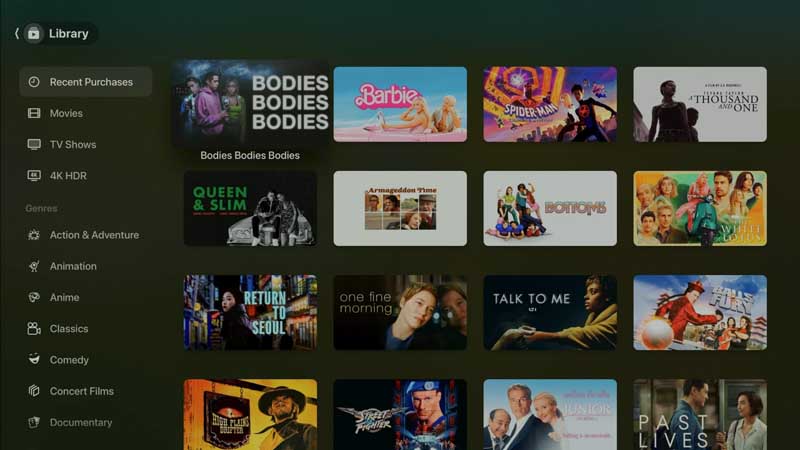
Apple Roll out tvOS 17.2 Beta

Additionally, any third-party apps that integrate with the TV app now have their own dedicated section. Before, only Apple’s own Channels had standalone tabs – this change gives equal billing to external media apps.

Channels within the app are now displayed as portrait cards rather than circular icons, modernizing their appearance. Overall the redesign aims to simplify navigating between different services and content while unifying the look.

The update comes as Apple is investing heavily in its TV+ streaming service and integrating additional perks like Friday Night Baseball and MLS Season Pass into the TV ecosystem.

The refreshed interface rolling out in the tvOS 17.2 beta signifies Apple’s continued efforts to improve the TV app as a centralized hub for finding entertainment across platforms.

While live TV support is still limited, the visual overhaul brings a cleaner and more unified experience for accessing the wide range of programming options available.

The changes should make it easier for Apple TV users to discover and view all of Apple’s video offerings, third-party apps and premium channels through one portal. For Apple, consolidating its video services via the TV app remains a key focus.

EDITOR PICKED: iOS 17 Release: Brings Upgrades to Contact Poster, Standby, Stickers, Journal app

Latest

OnePlus 16 Review: The Battery Beast That Also Happens to Be a Great Phone

OnePlus has never been shy about iterating fast, OnePlus...

OPPO Find X10 Pro Max Teleconverter Review: Kingfisher Photography in Your Pocket

There's a kingfisher that's become something of a local...

Xiaomi 18 Pro Max: Cloud-Enhanced Street Photography Explained

Smartphone camera hardware rarely surprises anyone anymore. Software behavior...

OPPO Find X10 Pro Max: Flagship Camera Phone Redefines Mobile Video

Smartphone cameras keep chasing the same benchmarks year after...

Newsletter

Don't miss

OnePlus 16 Review: The Battery Beast That Also Happens to Be a Great Phone

OnePlus has never been shy about iterating fast, OnePlus...

OPPO Find X10 Pro Max Teleconverter Review: Kingfisher Photography in Your Pocket

There's a kingfisher that's become something of a local...

Xiaomi 18 Pro Max: Cloud-Enhanced Street Photography Explained

Smartphone camera hardware rarely surprises anyone anymore. Software behavior...

OPPO Find X10 Pro Max: Flagship Camera Phone Redefines Mobile Video

Smartphone cameras keep chasing the same benchmarks year after...

Apple Reference Image: Verifying Real Photos Without Exposing the Photographer

Apple announced Apple Reference Image on September 15, 2026,...
Max Hyland
Max Hyland
Long form contributor Apple iPhone, iPad, watch reviews, opinion, editorial

OnePlus 16 Review: The Battery Beast That Also Happens to Be a Great Phone

OnePlus has never been shy about iterating fast, OnePlus 16 makes that philosophy crystal clear. At first glance, you’d be forgiven for thinking OnePlus...

OPPO Find X10 Pro Max Teleconverter Review: Kingfisher Photography in Your Pocket

There's a kingfisher that's become something of a local legend at Forest Park. Regulars talk about it the way birders talk about a white...

Xiaomi 18 Pro Max: Cloud-Enhanced Street Photography Explained

Smartphone camera hardware rarely surprises anyone anymore. Software behavior does. After shooting a handful of casual street photos, I found that the cloud-enhanced capture...