Android 14 QPR1 Beta Most intriguing use a Pixel Phone as your PC Webcam

Google has released the first beta version of Android 14 Quarterly Platform Release 1 (QPR1), unveiling some notable new capabilities. Most intriguing is the ability to use Pixel phones as webcams for PCs and Macs, Android 14 webcam feature works with any platform USB webcams, including android itself and Linux system.

Android 14 Introduces Ultra HDR Photo Format With 10-Bit Color Depth

The new “Device as Webcam” feature allows connecting a Pixel to a computer via USB and designating it as a webcam for video calling. This turns the high-quality Pixel camera into a webcam upgrade from your laptop’s built-in one. (Photo from X Mishaal Rahman)
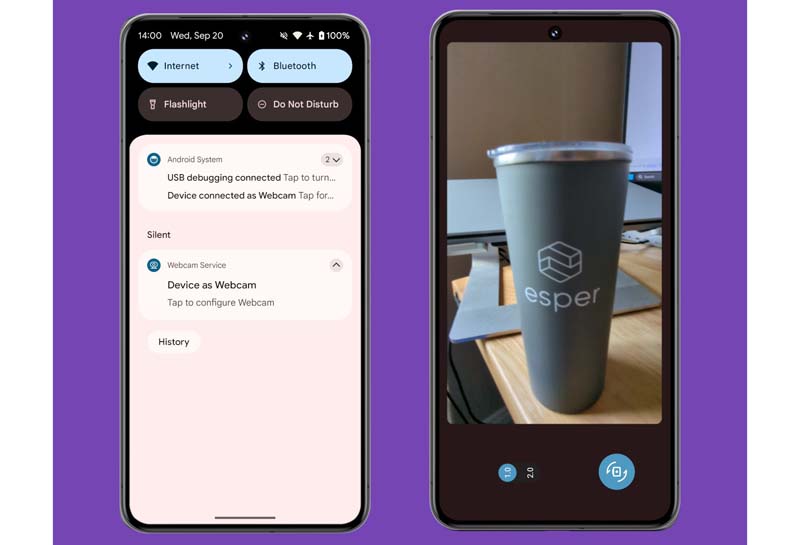
android-14-device-as-webcam

Setup is simple – just connect the Pixel with a USB cable and enable camera access on the phone when prompted. Users can switch between front and rear lenses, adjust zoom, and tweak other settings through the webcam preview window.

However, the experience isn’t wireless like on iOS. You’ll need to keep the Pixel physically tethered to your computer. Still, it provides an easy way to upgrade webcam quality without buying dedicated hardware.

Beyond Pixel phone webcam functionality, Android 14 QPR1 introduces more detailed battery usage info under Settings. You can now see metrics like manufacturing date, cycle count, and battery health for enhanced diagnostics and maintenance.

This beta also contains under-the-hood improvements to runtime, graphics rendering, stability, media, and connectivity. Google is focusing on refinement with Android 14 before the major redesign expected in next year’s Android 15 release.

The Android 14 QPR1 beta is currently limited to Pixel models for testing. But the update signals some handy features in the pipeline for all Android users once the stable version becomes available later this year.

EDITOR PICKED:

Google Postpones Android 14 stable version Release After Discovery of Bugs

How to Setup Your Android 14 Google Emoji Wallpapers on Pixel Phones

Latest

OnePlus 16 Review: The Battery Beast That Also Happens to Be a Great Phone

OnePlus has never been shy about iterating fast, OnePlus...

OPPO Find X10 Pro Max Teleconverter Review: Kingfisher Photography in Your Pocket

There's a kingfisher that's become something of a local...

Xiaomi 18 Pro Max: Cloud-Enhanced Street Photography Explained

Smartphone camera hardware rarely surprises anyone anymore. Software behavior...

OPPO Find X10 Pro Max: Flagship Camera Phone Redefines Mobile Video

Smartphone cameras keep chasing the same benchmarks year after...

Newsletter

Don't miss

OnePlus 16 Review: The Battery Beast That Also Happens to Be a Great Phone

OnePlus has never been shy about iterating fast, OnePlus...

OPPO Find X10 Pro Max Teleconverter Review: Kingfisher Photography in Your Pocket

There's a kingfisher that's become something of a local...

Xiaomi 18 Pro Max: Cloud-Enhanced Street Photography Explained

Smartphone camera hardware rarely surprises anyone anymore. Software behavior...

OPPO Find X10 Pro Max: Flagship Camera Phone Redefines Mobile Video

Smartphone cameras keep chasing the same benchmarks year after...

Apple Reference Image: Verifying Real Photos Without Exposing the Photographer

Apple announced Apple Reference Image on September 15, 2026,...

OnePlus 16 Review: The Battery Beast That Also Happens to Be a Great Phone

OnePlus has never been shy about iterating fast, OnePlus 16 makes that philosophy crystal clear. At first glance, you’d be forgiven for thinking OnePlus...

OPPO Find X10 Pro Max Teleconverter Review: Kingfisher Photography in Your Pocket

There's a kingfisher that's become something of a local legend at Forest Park. Regulars talk about it the way birders talk about a white...

Xiaomi 18 Pro Max: Cloud-Enhanced Street Photography Explained

Smartphone camera hardware rarely surprises anyone anymore. Software behavior does. After shooting a handful of casual street photos, I found that the cloud-enhanced capture...