
Many Europe friend asking about buy a Xiaomi (Mi 10 Ultra, Mi 11, Mi 11 Pro etc, or Redmi ( Redmi Note 9/ Note 10, Redmi K40 series) Chinese version smartphone, opening package and power on running MIUI system only English and Chinese languages, want flash multi-languages (Italian, Spanish, French, German etc.) . and can’t find Google service apps (Play Store, Google Maps and other Google apps) in the MIUI system.
Follow the guide to installing it, easy to flash Chinese version MIUI ROM to latest Global ROM. 3 steps to complete the installation :unlocking the bootloader, finding and download a global ROM, Flashing MIUI ROM it to your Xiaomi phones.
How to unlock the bootloader on xiaomi MIUI system
1, If this is a new smartphone, please complete MIUI guide first, insert SIM card and support call normal.
2, Use the phone number login xiaomi account, sure there is a phone number associated with this xiaomi account, or add phone number if there is not.
3, Touch Xiaomi phone MIUI system “Setting” apps > “About phone” tap on MIUI version 7 times enter to Developer Mode.
4, Touch Xiaomi phone MIUI system “Setting” apps > “Additional Setting” Developer options enable USB Debugging to Enable OEM Unlocking.
5, From Developer option Mi Unlock status add account and device.
6, Use PC or Notebook visit MIUI official website https://en.miui.com/unlock download Mi Unlock tool and setuo complete, login the same Xiaomi Mi account.
7, Turn off your xiaomi phones, press the Power button, and Volume down ( – ) button at the same time, enter to MIUI Fastboot mode. then connect the xiaomi phone to the windows system PC or Notebook via a USB Type-C cable.
8, Check MIUI unlock tool program ” Phone Connected” successfully > tap unlock.
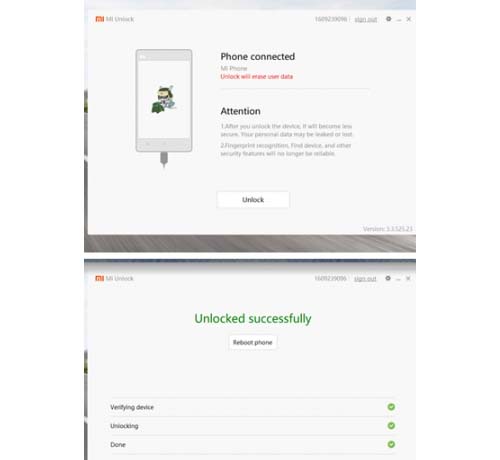
9, Please follow the steps to confirm the warning and Unlock anyway. if unlocked, the MIUI system reboot, please check the unlock status.
How to download a global MIUI ROM or multi-language MIUI ROM system.
1, Download MIUI Global ROM : Use PC or Notebook visit MIUI official website https://c.mi.com/global/miuidownload/index , if can’t find your xiaomi phone model on MIUI official download list such as (Xiaomi Mi 11, Mi 10 Ultra, Redmi Note 9 Pro, Redmi K40 etc..) please try unofficial MIUI ROM platform xiaomi.eu download it and use method 2: Fastboot update use MIUI ROM Flashing Tool
Method 1: local update install new ROM
Connect xiaomi phones to the PC or notebook via a USB-C cable, and copy the global ROM file into the xiaomi phones folder, copy success please touch “Settings” apps on your xiaomi phones > “About phone” > “System update” press ‘three dots’ icon at the top-right corner, > “choose update package” to enter.
Choose the global ROM file, your device will begin upgrading, your xiaomi smartphone should auto boot to the global ROM.
Method 2: Fastboot update flash new ROM
( https://c.mi.com/oc/miuidownload/detail?guide=2 ),
Download and setup MIUI ROM flashing tool from xiaomi official page url (Please copy the url to browser, download it total 64MB) : https://cdn.alsgp0.fds.api.mi-img.com/micomm/MiFlash2020-3-14-0.rar
Select the right Xiaomi smartphone model the MIUI Global ROM version, back to top unlock bootloader step Turn off your Xiaomi phones, press power button, and volume down ( – ) button at the same time, enter to MIUI fastboot mode. then connect the Xiaomi phone to the windows system PC or Notebook via a USB Type-C cables.
Install new MIUI Global ROM manual, please going MIUI official download page, MIUI have detailed step by step install new Global MIUI ROM.


Many users experience will choose the global version/EU version of MIUI so how to use Xiaomi Mi Wallet on MIUI?
MIUI 12.5 stable version will start OTA in March 2021, MIUI 12.5 development version has been updated, MIUI 12.5 Global stable version OTA schedule diary will be in mid-April 2021.
After Xiaomi 11 upgraded MIUI 12.5, the advantages of linear motors have added a natural “touch”
Redmi K40 Price, Spec and Reviews https://www.gizmoweek.com/xiaomi-redmi-k40-price-spec-and-reviews/
Xiaomi Mi 11 Ultra Phones Reviews, Spec, Price https://www.gizmoweek.com/xiaomi-mi-11-ultra-phones-reviews-spec-price/
Redmi K40 Gaming Edition Price, Reviews, Specification https://www.gizmoweek.com/redmi-k40-gaming-edition-price-reviews-specification/
MIUI12.5 stable version, officially launched!
The first supported models: Mi 11 Ultra, Mi 11 Pro, Mi 11, Mi 10 Ultra, Mi 10 Pro, Mi 9 SE
Hi Tony! I’m using Mi 9 SE Chinese version phone. After updating to MIUI 12.5 all google services have been blocked. Whats your recommendation to change chinese ROM to global or any other convenient way to use google services again??
Thank you if you respond earlier.
Going Mi APP Store app, search bar type “Google” find “Google Play Store”, install Google Play Store apps and other Google apps.
Hello I want to convert my chinese rom to global miui… Currently I’m using new 12.5.1 stable version update which stopped all my earlier working Google apps, playstore, YouTube, Gdrive, Gmaps, etc…. Ple help me convert it on redmi note 7 pro…
How to activate gyroscope on my redmi 9i?
Theirs a few tutorial but, I don’t think we can’t do the same..
Please help me about note 9 pro 5G . I want to change chinese ROM to global ROM.
Unlock your MIUI System, going xiaomi.eu download ROM file install it.
Hello the URL given to download global rom are not opening… They are forbidden
Xiaomi MI 11 Ultra and MI 11 Pro China version MIUI 12.5 Install Google Play Store https://www.gizmoweek.com/xiaomi-mi-11-ultra-and-mi-11-pro-china-version-miui-12-5-install-google-play-store/
i did tried installed but there is mobile network not in working. please help me to check. thanks.
Hi Tony! I’m using Redmi 9 Chinese version phone. After updating to MIUI 12.0.1Stable all google services have been blocked. Whats your recommendation to change chinese ROM to global?? I tried with “GetApps” > Search “Google ” > installed ” Google Installer” but unfortunately not working.
Thank you if you respond earlier.
Hello, Please unlock miui bootloader next install Gobal ROM zip file.
Want to change my chainees version to global MIUI 12.5
Plz help
plz tell.me.about redmit note 8 pro
There are more useful parts in Chinese version but fcm push doesn’t work well……My Mi6 has been flashed to global version of MIUI11,fcm can directly connect. I plan to flash my Mi11 to EEA but I need mipush to broadcast many Chinese APP. 😭
Hello I want to convert my chinese rom to global miui… Currently I’m using new 12.5.1 stable version update which stopped all my earlier working Google apps, playstore, YouTube, Gdrive, Gmaps, etc…. Ple help me convert it on redmi note 7 pro…
will this clear out all the on phone data such as my pictures or app data? like ganes ans such
Yes, Please backup your phones first !
Is there any other option to install google framework in redmi note 10 pro miui version of Chinese version.
i have a Red 8 China Rom.
Can you change mine to global rom. my tel 9489 4360.
Experience with Xiaomi 12s ultra phones, Global ROM with Play Store? https://www.gizmoweek.com/experience-with-xiaomi-12s-ultra/