
Apple confirmed that iPhone Duo represents its entry into foldable phones, and most coverage since has focused on the hinge, the screens, and the price tag. More interesting story sits on Apple’s developer site, where new frameworks quietly change what an iPhone app can do. Camera behavior, front-facing capture, hinge input, and even the idea of a main screen all shift once a phone opens like a small tablet. None of that shows up on a spec sheet, yet it may matter more than the fold itself.
Apple’s Scene Accessories system introduces a capability called CameraCaptureAccessory, and it lets a camera app keep its main controls on the inner display while sending a different view to the outer one. Developers can now treat the second screen as a separate surface instead of a mirror of the first.

Picture a filmmaker recording an interview. Inner display can hold waveforms, exposure data, and recording controls, while the outer display shows the subject a live preview of themselves. Nobody has to angle a separate monitor into view; the phone handles both roles at once.
Same accessory works as a teleprompter too, and Apple built a sample project showing exactly how to set one up. Podcasters, course creators, and social video producers already rely on some version of a prompter, and building one into a phone’s second screen removes a category of extra hardware from the setup.
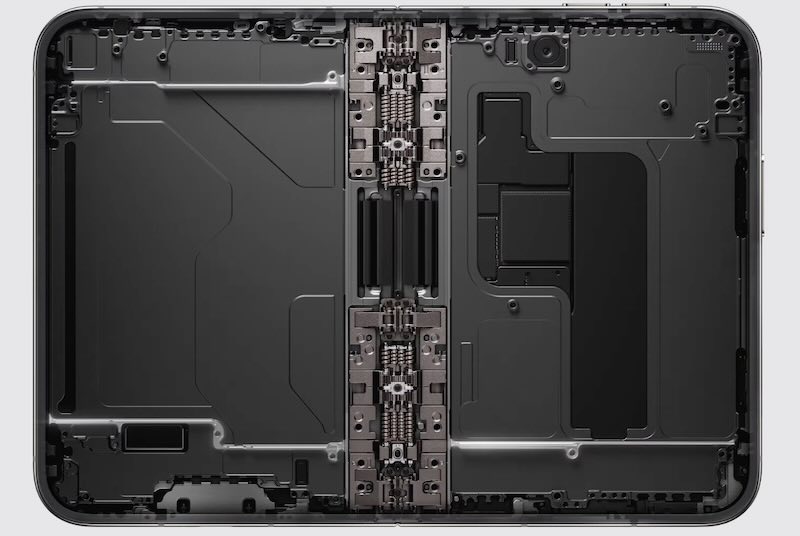
iPhone Duo carries two distinct front-facing camera setups instead of the usual one: an under-display sensor behind the inner screen, and a more capable system behind the outer display that can record up to 4K at 120 frames per second. Once a phone has two displays that can face opposite directions, “front camera” stops being a fixed idea.
Apple’s answer is a Virtual Front Camera. When an app requests it, iOS automatically selects whichever physical sensor faces the user based on how someone is holding the device. Trade-off: a virtual camera can only guarantee what both sensors support in common, capping most apps around 1080p at 60 frames per second. Anything beyond that, including 4K120 or depth data, means talking to a physical camera instead of the shared virtual one.
To manage that complexity, Apple introduced AVCaptureDeviceDirectionCoordinator. It weighs how the camera, the display, and the device’s posture relate to each other, then figures out which physical sensor points at the user. On a conventional iPhone, front never changes. On a foldable, it can flip the moment someone opens or closes the hinge, and this coordinator keeps that shift from breaking a camera app’s assumptions.
Beyond the cameras, Duo pushes iOS to run several windows, displays, and scenes together instead of just one of each. It’s the first iPhone capable of running two copies of the same app at once, alongside Split View and content that differs from one display to the other. Useful as that is, the hinge itself may matter more.
SwiftUI’s onHingeChange modifier and UIKit’s UIHingeInteraction go beyond basic open, closed, and half-open states. Both expose a hinge angle that updates continuously, so folding stops being a single on-or-off layout event. A camera app could link that angle to an exposure control, a 3D app could let it drive perspective, and a game might turn it into a new analog input. Apple’s sample project uses hinge angle to bend the pitch of a virtual instrument. What happens once a hinge behaves less like a switch and more like a dial?
Apple didn’t launch a separate toolkit for foldables. It builds on frameworks developers already know: UIKit, SwiftUI, Scene, and AVFoundation. From there, Apple didn’t stop at code either. Its developer site picked up new course material, walking teams through adaptive interfaces, working across two displays, coordinating scenes, reading the hinge, and building camera features for the fold, with Xcode 27.1 supplying the matching toolchain. Treating iPhone Duo as an extension of the existing platform suggests Apple sees this as a starting point rather than a single unusual device.
That shift shows up in a piece of code many developers stopped thinking about years ago. For more than a decade, one iPhone meant one screen and one primary window, an assumption built so deeply into iOS development that UIScreen.main became second nature. On a device with two displays, that assumption falls apart, since there’s no longer one obvious main screen to point at.
In its place, Apple directs developers toward Window Scene, Trait Collection, Environment, and Scene Bounds to work out where an interface is rendering. Orientation thinking fades too. Rather than asking whether a phone sits in portrait or landscape, developers ask how much space their window has to work with. That’s a different question, and it’s likely to outlast this piece of hardware.
None of Apple’s examples require the outer display to copy the inner one. It can just as easily carry information meant for someone else, rather than repeat what’s already on the inner screen. Beyond video calls and camera monitoring, that creates room for translation apps, media players, games, learning tools, and creative or video-editing software that treats the two screens as different spaces instead of duplicates of each other.
Add a hinge angle that changes continuously instead of snapping between fixed states, and the most interesting apps probably haven’t shipped yet. Apple built the hardware and started the software story. Whatever developers do with two screens and one hinge next will fill in the rest. Apple built two screens and called it Duo; for developers, it may end up marking two very different eras of writing iPhone apps.

