
iPadOS 17 is here, and it’s bringing a host of new features that are sure to delight users. One of the most significant updates is the introduction of interactive Widgets on Lock Screen, which has been long-awaited by iPad enthusiasts. So, what do these interactive widgets have in store for us?
The official Apple interactive widgets in iPadOS 17 pack quite a punch, enhancing the user experience in several pre-installed apps. For music lovers, the Music app widget now allows you to play and pause tunes directly by clicking the “play” button next to the song title. However, it still lacks buttons for skipping tracks or adjusting the volume. Similarly, the Podcast app gets a nifty upgrade, enabling users to play and pause podcasts with a single click.
These interactive widgets can be placed on the Home Screen for easy access. The reminders app widget gets a practical update, allowing users to mark completed tasks directly, and the number of pending tasks gets updated accordingly. The Home app offers widgets of various sizes to control the on/off status of home accessories, while the Shortcuts app lets users run specific shortcuts right from the widget without entering the app.
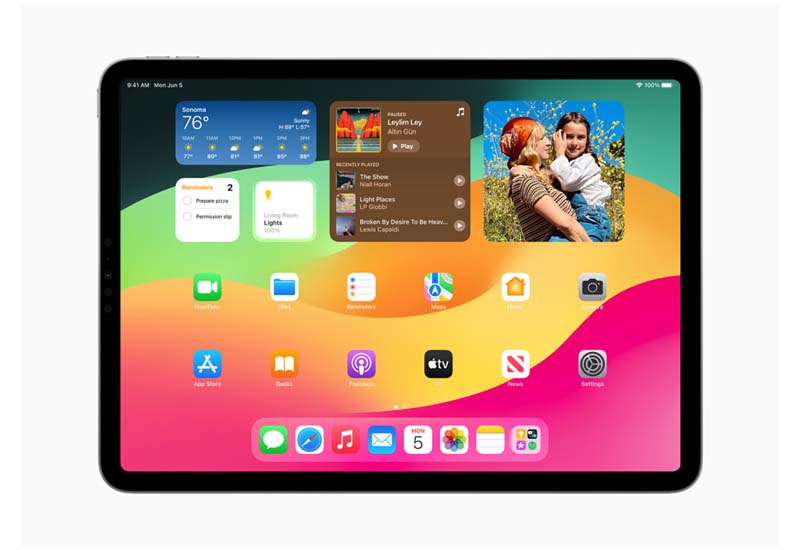
Though the interactive widgets in iPadOS 17 beta 1 come with limited functions and buttons, we can expect third-party app widgets to bring more innovative features and designs when the stable version of iPadOS 17 is officially released.
Doesn’t stop at widgets. The Notes and PDF annotation apps have received some valuable updates, too. In the Notes app, inserted PDFs are now displayed directly on the page rather than as a thumbnail, and users can adjust the display size. This feature allows users to annotate PDFs with an Apple Pencil without having to open them through quick preview. Plus, you can now add links between notes.
When it comes to PDF annotation, Unlocking iPadOS 17 introduces an automatic form recognition feature that recognizes tables and blank spaces in PDF pages, providing suggestions based on the table structure. Access this feature by clicking the “Form Fill” button in the toolbar. If the recognition isn’t automatic, users can add items manually by clicking the “+” button in the lower right corner of the page. This feature also works for PDF files opened through quick preview, such as in Notes or Files.
The style of focus search in iPadOS 17 has changed, grouping search suggestions and best results in a single area. Focus search now offers direct shortcuts to some app functions, like the “Favorites” album when searching for photos or recently used files when searching for files.
And if you’re an external keyboard user, iPadOS 17 has a treat for you: the input method candidate option highlight color is automatically extracted based on the current pane color.
WWDC23 iOS 17 HOW TO Editor Picked:
How to Make the Most of iOS 17 Contact Poster Feature on Your iPhone
How to Use and Customize Standby iOS 17 turn your iPhone into a Smart Display

